

Skip to content
UsersAdvice

UsersAdvice

Guides and Reviews

  • Home
  • Topics
    • Blogging
    • Edtech
    • Technology
    • Guides
  • Information
    • About Us
    • Privacy Policy
    • Terms of Use
    • Sitemap
    • Contact Us
  • Home
  • Topics
    • Blogging
    • Edtech
    • Technology
    • Guides
  • Information
    • About Us
    • Privacy Policy
    • Terms of Use
    • Sitemap
    • Contact Us
Technology

Webkinz – Play Games With Virtual Plush Toys and Pets

Kane Danby Kane DanJanuary 10, 2022February 2, 2022
webkinz

Webkinz is a website where you can play different types of games. Webkinz desktop software/app is also available. You can also download it for Macintosh.

So, If you don’t like to play it in the browser then you can simply download the desktop app and Install it. Now, you do not need any web browser to play this game.

General Information

Type of Website: Virtual Toy Games and Activities

Account Registration: Yes, It is required to play the games

Official Website: webkinz.com

Suggested Read: Cool math games – Best Math Brain Game Websites

What is Webkinz

Webkinz is a virtual world of the toy where you can play with your pets. It is a software which is available for web browsers, Windows, Android phones, and Mac.

You can also download the android app on your phone If you want to play it on your mobile. Anyone above the age of 6 years can use it as per the official data.

The website, app, and desktop application of Webkinz is available only in English.

Webkinz world offers a different variety of games such as arcade, tournament, etc and in which the player can play it to get the Kinzcash. Multiplayer games are also available to play with your friends.

They also provide an option to buy plush from ganz estore. It is a good website for fun activities like decorating a room, play games, adopt a pet, take care of your pet, Play with your pet, dress your pet in awesome clothes, learning activities, etc.

Membership plans are also available on a monthly and annual basis. All the Webkinz world deluxe membership plans include additional benefits such as membership hat, exclusive store pets, items and themes, monthly gift boxes, deluxe arcade games, and more.

Suggested Website: Hoodamath – Play Math Games Online

Webkinz Login – How to start playing the game on Webkinz?

1. Webkinz login is required to play the games. So, The first step is to open the website and click on the play button.
webkinz

2. After that click on the, I am New button for creating your account.
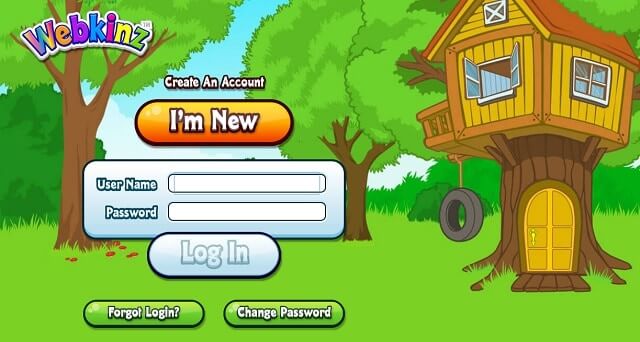
webkinz login

3. Now, You have to choose a pet to start playing this game. There are 8 pets available for free. But if you have an adoption code then you can use that code to get other pets. I am selecting a wolf as my pet.

webkinz pets

4. Give a name to your pet by typing the name in the box and select the gender. I have given scuboo name to my pet. After that, click on the next step.

webkins

5. Now, this step is important. Type your username, password, and greeting name. Whenever you want to play this game, a Username and password will be required. You need to remember your username and password.
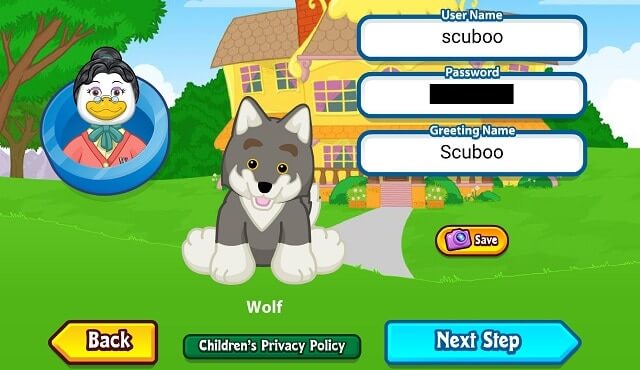
webkinz app

6. Tick mark on the user agreement and click on the next step button.
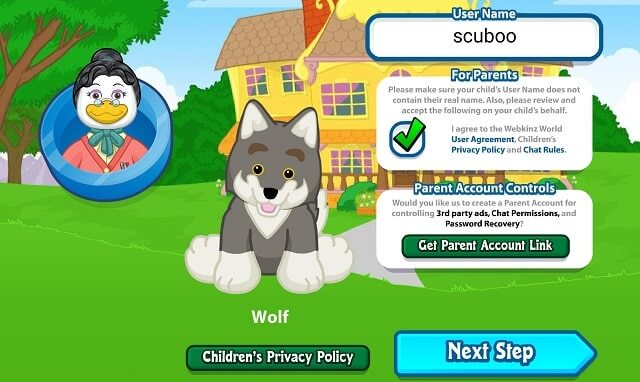
online pet game

7. Now, everything is done. You can start playing with your pet. You can do things like moving, feeding, and caring for your pet.

pet game webkinz


Recommended Topics

  • Sheppard Software: Free Online Learning Games For Kids
  • ABCya – Fun Learning Educational Games for Kids
Taggedwebkinswebkinzwebkinz codeswebkinz gamewebkinz loginwebkinz newzwebkinz petswebkinz world

Post navigation

Previous Post Previous post:
Sheppard Software: Free Online Learning Games For Kids
Next Post Next post:
Pearson Realize For Digital Learning (Savvas Learning Company)

Kane Dan

View all posts by Kane Dan →

You might also like

Effective Test Automation With Selenium And Python

5 Tips For Effective Test Automation With Selenium And Python

March 30, 2023November 15, 2023
Lottomarts Gaming Realm Tech Challenges Unveiled

Lottomart’s Gaming Realm: Tech Challenges Unveiled

September 28, 2023September 29, 2023
Assessing Your Current Setup

4 Tips & Tricks To Improve Your Residential Internet: A Guide To Safer Connection 

January 30, 2023January 27, 2023
Facebook and AI

Beyond the Screen: 5 Fascinating Uses of AI by Facebook (2024)

July 26, 2023
Upgrading to Oracle Electronic Business

Know About The Latest Features In Oracle Ebs

November 26, 2022November 29, 2022
fact monster

Fact Monster – Educational Site For Kids

January 5, 2022February 2, 2022

Latest Posts

Boom Lift

Discover Affordable Boom Lift Rentals for Your Next Project

December 1, 2025December 1, 2025
Top Qualities to Look for in Commercial Roofing Contractors

Top Qualities to Look for in Commercial Roofing Contractors

November 5, 2025November 5, 2025
Buying a Franchise in Canada

Steps to Buying a Franchise in Canada

July 25, 2025
rituximab

How Much Does Rituximab Cost Globally?

April 9, 2025April 15, 2025
Shiba Inu Coin

Navigating the Crypto Landscape ─ Insights on Cryptocurrency Exchanges and Shiba Inu Price Trends

October 30, 2024
SF Tech Week

How Vera’s AI Services Elevate Your SF Tech Week Experience

September 30, 2024October 1, 2024
Cobot Arms

Boosting Efficiency ─ The Role of Cobot Arms in Modern Manufacturing

August 14, 2024
PCs Power

3 Reasons Why It’s Important to Monitor Your PC’s Power Consumption

May 30, 2024
Caring For Care

Caring For Care Earns Prestigious Endorsement from Skills For Care

May 28, 2024
Documents Suppliers

Key Documents Suppliers Require To Win Disputes Against Chargebacks

May 10, 2024

Contact us

Email:  desk@usersadvice.com

Copyright © 2025 UsersAdvice.